


Complete Office Furniture Packages in Century City for Every Team
A complete office setup takes more than matching desks. Complete office furniture packages in Century City bring together desks, ergonomic seating, workstations, and storage to suit how your team works. A practical plan also accounts for meeting rooms, reception areas, shared spaces, and the office layout.
Furniture selection is only part of the project. You also need a plan for fitting each item into the space and coordinating procurement, delivery, and installation. A complete package connects these steps, from space planning and product selection through to installation, keeping the project organized from the initial layout to the finished workspace.
This guide explains how to assess desks and tables, seating, workstations, and storage, and how to shape a practical furniture plan. It also covers delivery and installation planning for Century City, so you can prepare for the project and define the next steps for your workspace.
Table of Contents
Desks and tables
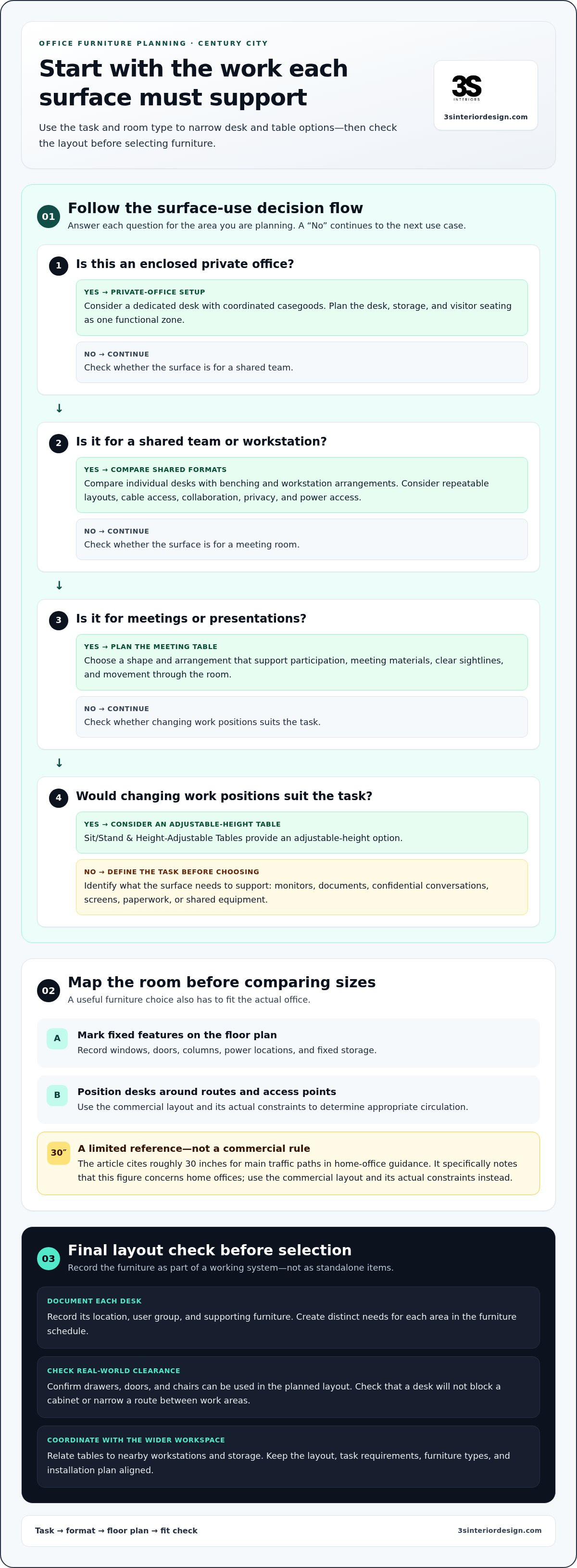
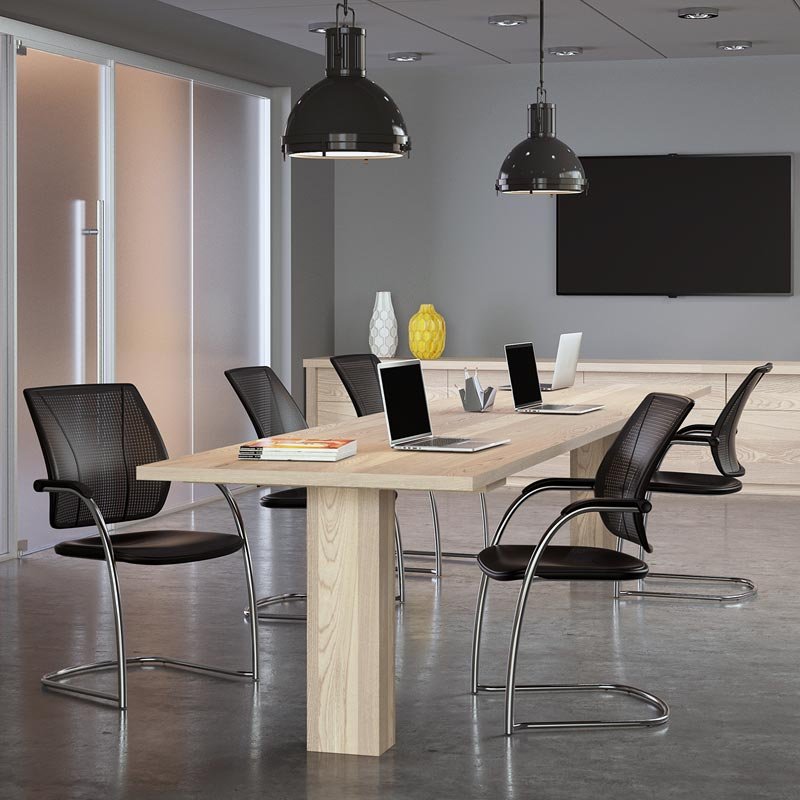
Start with the work each surface must support. A private office desk may need space for a monitor, documents, and confidential conversations. A shared workstation may prioritize repeatable layouts and cable access. A conference table must accommodate meeting materials and support clear sightlines. Define each use before selecting sizes, finishes, or configurations.
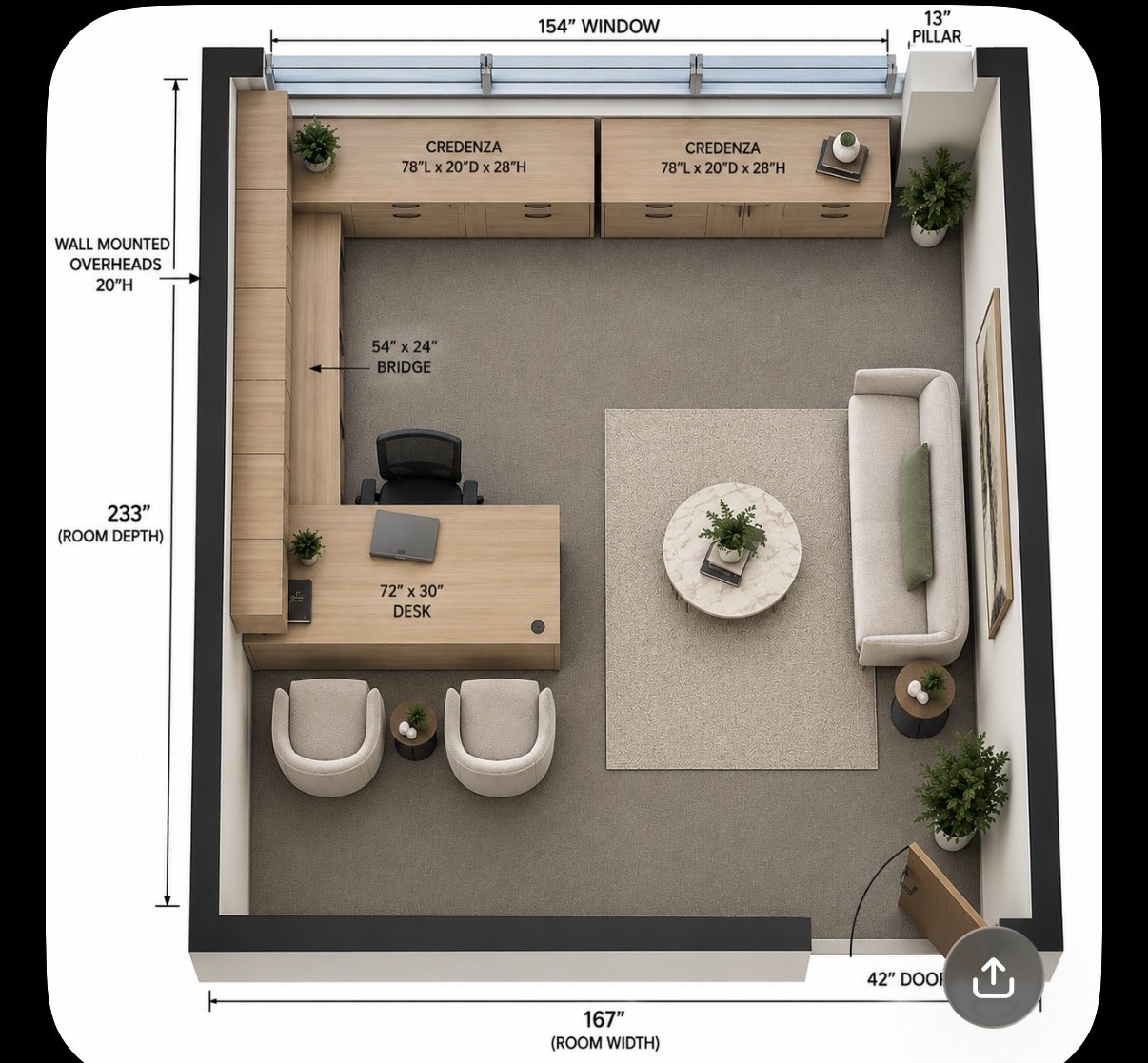
Map the office before comparing desk options. Mark windows, doors, columns, power locations, and fixed storage on the floor plan. Then position desks around circulation routes and access points. For home-office planning, the guidance in the research recommends roughly 30 inches for main traffic paths. That figure concerns home offices, so use the commercial layout and its actual constraints to determine appropriate circulation.
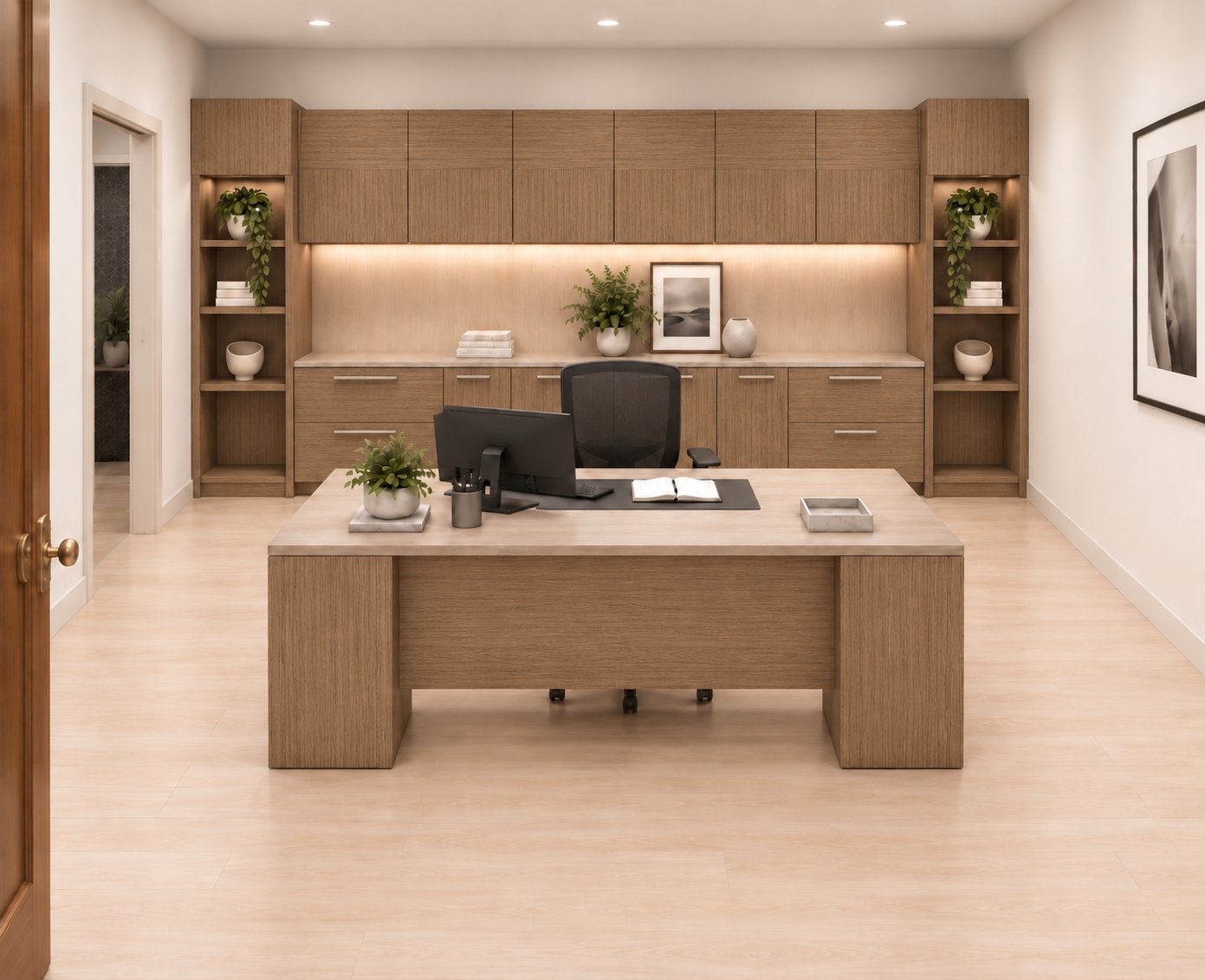
Next, match the desk format to the work. Private Office Desks & Casegoods suit enclosed offices where a dedicated desk and coordinated casegoods support focused work. Sit/Stand & Height-Adjustable Tables provide an adjustable-height option. For shared teams, compare individual desks with benching and workstation arrangements. Consider how people use screens, paperwork, and shared equipment throughout the day.
Private offices: Plan the desk, storage, and visitor seating as one functional zone.
Team areas: Align desk placement with collaboration, privacy, and power access.
Meeting rooms: Select a table shape that supports participation and clear movement.
Flexible work: Consider height-adjustable tables where changing work positions suits the task.
For example, a team reviewing printed plans needs accessible document space, while a screen-based team may prioritize monitor placement and cable routing. A presentation room may need a table arrangement that keeps attendees facing the display. Use these requirements to create a furniture schedule with distinct needs for each area.
Before making final selections, record each desk’s location, user group, and supporting furniture. Check that drawers, doors, and chairs can be used within the planned layout. Confirm how tables relate to nearby workstations and storage. This helps catch conflicts before procurement, such as a desk blocking a cabinet or narrowing a route between work areas.
Complete office furniture packages in Century City should coordinate desks and tables with the wider workspace plan. Treat each surface as part of a working system, not a standalone purchase. Documenting the layout, tasks, and furniture types together gives decision-makers a consistent basis for comparing options and planning seating, workstations, and installation.
Office chairs and seating
Choose chairs according to the task, user, and time spent seated. A chair for focused computer work has different requirements from conference seating used for shorter meetings. List the seating roles first, then match each to the required support and adjustability. This prevents one chair specification from being applied to unrelated work areas.
Which furniture brands and quality levels are offered in office packages? Packages can combine office seating across different functions and quality levels, but brand names depend on the selected products. Compare construction, adjustment options, upholstery, and intended use rather than relying on a label alone.
For daily desk work, assess seat height, back support, armrests, and ease of adjustment. Users should be able to reach the desk without straining or twisting. At shared workstations, accessible controls make it easier for different users to adjust a chair. For meeting rooms, consider stable support and a profile that fits the table and room layout.
Which office furniture vendors serve Century City, Los Angeles? Commercial office furniture vendors serving Century City can supply seating for workstations, private offices, reception areas, and conference rooms. Compare package scope by the functions covered, such as chair selection, delivery, and installation coordination.
Are office furniture packages available for small, medium, and large offices? Yes. Packages can be planned for projects of different sizes by matching furniture selections to the floor plan and the needs of each area. A small suite may need task chairs and visitor seating, while a larger office may need coordinated seating across departments and meeting rooms.
Are used or refurbished office furniture packages available near Century City? Used and refurbished furniture is a separate purchasing category from new commercial furniture packages. For a new office setup, define the chair types and quantities needed for each area, then align selections with the project’s furniture plan.
What warranties and return policies apply to office furniture packages? Coverage and return terms depend on the selected products and transaction terms. Review the written terms for each chair, including applicable coverage and how returns are handled, before finalizing the package.
Build a seating schedule before comparing options. List the room, chair function, quantity, and required adjustments for each item. For example, separate task chairs from conference and reception seating. This makes package proposals easier to compare and helps prevent missing seats during setup.
Pair seating decisions with the office layout, not just desk counts. A chair needs room to move and fit its user at the work surface. If you’re planning office seating for your workspace, connect chair selection with the floor plan and installation sequence.
Cubicles and workstations
Plan workstations around team tasks, not just furniture counts. A finance group may need focused individual work, while a project team may share documents throughout the day. These differences affect privacy, desk orientation, and access to shared resources. Record how each department works before choosing cubicles, benching, or a mixed layout.
Choose cubicles when defined work zones support concentration or confidential tasks. Open workstations suit teams that need frequent coordination and shared access. A hybrid floor plan can place enclosed work areas near collaborative zones. For example, customer support staff may need consistent desk setups, while nearby meeting spaces support group discussions.
Compare each layout with the actual floor plan. Mark columns, windows, doors, power points, and fixed building features, then map where each workstation begins and ends. Check whether storage, chairs, and cabinet doors can be used without blocking circulation. A drawn plan can reveal conflicts before furniture is ordered.
Privacy: Identify tasks that require visual separation or reduced interruption.
Collaboration: Place shared teams where conversation and quick coordination fit.
Technology: Plan monitor positions, power access, and cable routes together.
Storage: Assign personal and shared storage based on daily use.
Panel configuration affects how a workstation feels and functions. Higher partitions provide more visual separation, while lower dividers make interaction across desks easier. Choose based on the work rather than defaulting to a standard package setting. Teams handling sensitive records, for instance, may need clearer boundaries than colleagues sharing routine project updates.
Standardized workstation modules can simplify planning across departments. Use consistent desk orientations and shared components where roles have similar needs, while keeping distinct specifications for teams with different equipment or privacy requirements. This creates an organized furniture schedule without forcing every employee into the same setup.
Plan for future changes as well as current headcount. A layout with movable components can be easier to adjust when a team changes location or function. Identify which desks can move, which power connections serve them, and what shared resources must remain accessible. Including these details makes future revisions part of the plan, rather than an improvised response.
Before approving a workstation package, review the plan with facilities and technology teams. Confirm furniture locations against power access, equipment needs, and installation sequence. Document workstation types, quantities, and shared components by department. For complete office furniture packages in Century City, this coordination connects cubicle selection to the wider office layout and project requirements.
Delivery and installation
Organize delivery around the approved furniture plan, not a general room list. Create a final inventory that shows each item, its destination, and its intended location. For example, label workstation components by department and conference tables by room. This makes receiving and placement easier to coordinate and gives facilities teams a shared reference during setup.
Before delivery, map the route from the building entrance to each destination. In Century City, coordinate building access, loading arrangements, elevator use, and delivery procedures with property management. Identify narrow corridors, doors, and turns that may affect large desks or tables. Clear the routes and prepare each room for its scheduled furniture placement.
Use an installation sequence that supports the project’s dependencies:
Prepare: Clear work areas and verify furniture locations against the current floor plan.
Receive: Match arriving items to the inventory and note any visible damage or missing components.
Place: Direct desks, seating, and storage to their assigned rooms or workstations.
Assemble: Install furniture according to the selected configuration and manufacturer instructions.
Review: Walk through each area and compare the installed setup with the furniture plan.
Installation sequence matters. Place larger items before smaller accessories or movable seating. For example, position a conference table before arranging chairs around it. This reduces unnecessary handling and keeps room access clear during assembly. Coordinate workstation installation with related components, such as panels and desk surfaces.
Keep a designated receiving area available for items awaiting placement. Separate furniture by floor, department, or room, and use clear labels that match the inventory. A chair for reception should not be staged with workstation seating. This simple control helps prevent misplaced items and confusion during a setup involving multiple rooms.
Professional furniture installation connects delivery, assembly, and placement as part of one coordinated project. To prepare, share the approved layout, item schedule, room names, and building access procedures with the project team. Identify who can answer questions about site access and room assignments on delivery day. Clear responsibilities help resolve placement decisions efficiently.
After installation, inspect each room against its plan. Confirm that desks face the intended direction, chairs reach their work surfaces, and storage does not obstruct doors or access routes. Record any adjustments needed before teams move in. A structured review links the furniture schedule to the finished workspace.
Filing and storage furniture
Plan storage around the materials employees handle and retrieve. A filing system for active project documents serves a different purpose from a cabinet for archived records. List what each department stores, who needs access, and how often items are retrieved. This helps distinguish personal storage from shared filing and reference areas.
Match the furniture type to the material. Filing cabinets organize folders, while open shelving keeps reference binders visible. Credenzas combine office storage with a work surface. In reception areas, enclosed storage can keep supplies accessible without placing them in public view. Give each selection a defined use on the floor plan.
Separate frequently used items from materials accessed less often. Place daily forms and active folders near the employees who use them, and locate archived project files in a designated storage area. For example, a project team can keep current documents near its desks and less-used reference material on shared shelving.
Personal storage: Assign drawers or cabinets for individual work materials.
Shared filing: Group department records by function or project.
Reference storage: Use shelving for binders employees regularly consult.
Reception supplies: Keep frequently used materials organized near their point of use.
Map storage locations before selecting furniture. Mark cabinets, shelves, and filing units on the office plan alongside desks and workstations. Check that drawers can open fully and cabinet doors do not conflict with nearby furniture. A cabinet behind a chair, for example, may be difficult to access during normal work.
Plan labels and organization alongside the furniture schedule. Assign each shared unit a clear department or material category, such as contracts, project files, or office supplies. This makes the intended use visible during setup and helps employees return materials consistently. Keep the labeling scheme aligned with existing office practices.
Storage needs vary by team. Finance staff may need filing space for working documents, while a conference room may need a cabinet for presentation materials. A reception area may need storage that supports daily operations without cluttering the desk. These examples show why one storage type rarely suits every room.
Include storage and filing systems in the overall furniture plan, then coordinate their placement with delivery and installation. Furniture installation services can help position units according to the approved layout. Before the project begins, organize your storage requirements by room and function. Plan office storage and filing systems as part of a coordinated workspace.
3S Interior Design: Private Office Desks & Casegoods
3S Interior Design helps businesses turn furniture requirements into a coordinated workspace plan. When you need to align private offices, team areas, and meeting rooms, its process includes consultation, space planning, product selection, procurement, delivery, and professional installation.
Selections can include Private Office Desks & Casegoods, Ergonomic Office Seating, Workstations & Cubicles, and Conference Room Furniture. Space planning connects those choices to the floor plan, and installation places the furniture in the planned workspace. This integrated approach can support office moves, new setups, and furnishing updates across multiple work areas.
To discuss your office furniture needs, contact 3S Interior Design.
Move Your Workspace Plan Forward
Turn your workspace priorities into a clear project brief. Identify which teams need dedicated work areas, what each room must support, and how the finished office should operate. A shared plan gives decision-makers a consistent basis for moving from requirements to furniture selection and helps keep future workspace changes aligned with current needs.
For complete office furniture packages in Century City, 3S Interior Design offers Private Office Desks & Casegoods, Ergonomic Office Seating, and Workstations & Cubicles. These categories can support a coordinated plan for offices and team areas, with selections informed by the needs of your space.
When you’re ready to discuss your office requirements, contact 3S Interior Design today. A well-defined plan is a practical starting point for building a workspace that serves your team.
Frequently Asked Questions
What is included in a complete office furniture package in Century City?
A package brings together the commercial furniture categories your office needs. Depending on the project, this can include desks and casegoods, ergonomic seating, workstations, conference room furniture, reception furniture, and storage. For Century City businesses, the right mix reflects how teams use each room and what the floor plan can accommodate. A complete furniture plan also coordinates selections with delivery and installation.
Can Century City furniture suppliers provide space planning and installation?
Yes. 3S Interior Design provides space planning and layout design, along with furniture installation services, for commercial workspace projects. Planning can align furniture selections with room functions, team needs, and the office layout before procurement and installation. For example, a business furnishing a new suite can coordinate private offices, work areas, and meeting spaces within one project process. This supports a more organized transition from plan to setup.
What are typical lead times for office furniture delivery in Century City?
There is no single lead time for every office furniture project in Century City. Timing depends on the selected furniture, procurement requirements, project scope, delivery coordination, and installation sequence. A project involving several types of work areas requires different coordination from furnishing one room. Building access and office readiness also affect how delivery and installation fit into the project schedule.
Comments