


Height Adjustable Desks: Los Angeles Buying Guide
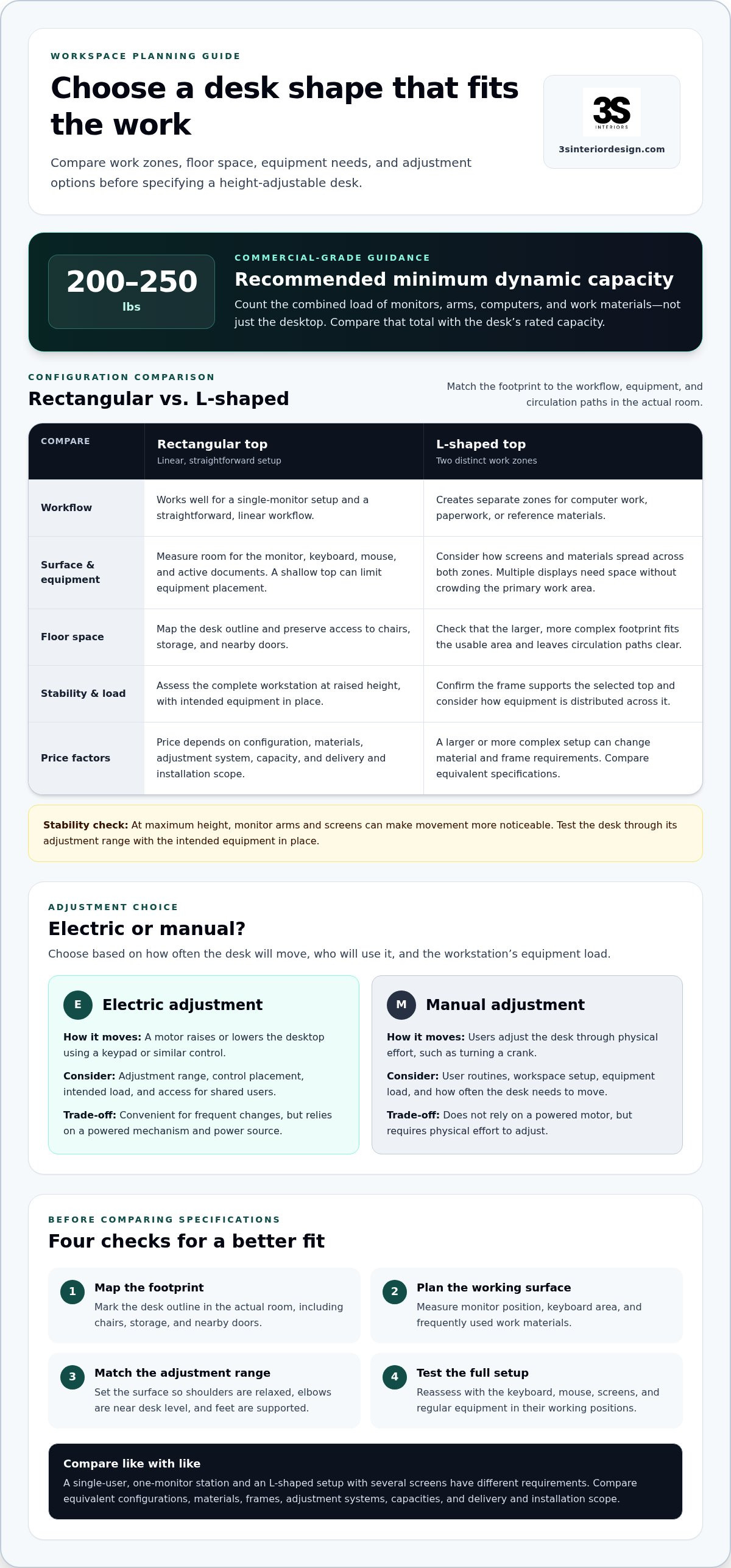
The right desk shape is the one that supports the work, not simply the one with the most surface area. Choose a standard standing desk for a straightforward workstation; consider an L-shaped configuration when the layout and workflow call for two work zones. For commercial-grade use, the guide recommends a minimum dynamic capacity of 200 to 250 lbs for height adjustable desks.
Choosing height adjustable desks involves more than deciding between electric and manual adjustment. Configuration, materials, stability, load capacity, and project scope all affect how well a desk works for your team and Los Angeles office.
Compare standard and L-shaped layouts, assess the features that matter, and plan practical changes between sitting and standing. Use the guidance below to match desk requirements to your workspace, equipment, and daily routines before making a decision.
Table of Contents
Desk dimensions and configurations
Choose a footprint that suits the workstation’s tasks, equipment, and circulation paths. A rectangular top works well for a single-monitor setup and a straightforward workflow. An L-shaped configuration creates separate zones for computer work, paperwork, or reference materials. Before selecting either, map the desk outline in the actual workspace, accounting for chairs, storage, and nearby doors.
Set a standing desk so your shoulders are relaxed, your elbows are near desk level, and your feet are supported. Adjust the surface for the person using it, then reassess with the keyboard and mouse in their working positions. A height-adjustable frame is useful only if its range suits the intended users.
Desk depth determines how the monitor, keyboard, and work materials fit together. A shallow top can limit comfortable equipment placement, while a deeper surface takes up more floor space. Measure the planned monitor position, keyboard area, and frequently used materials. For example, a multiple-screen setup needs enough room for each display without crowding the primary work zone.
Compare configurations by recording these details before requesting pricing:
Top shape: rectangular for a linear setup, or L-shaped for distinct work zones.
Footprint: measure the usable area and preserve access to surrounding furniture.
Working surface: allow space for screens, input devices, and active documents.
Adjustment range: match the desk’s lowest and highest positions to its users.
Desk dimensions affect the overall price because a larger or more complex configuration changes the materials and frame requirements. A project's desk price depends on configuration, materials, adjustment system, capacity, and delivery and installation scope, and is provided after a quote request. Compare equivalent specifications rather than comparing a basic rectangular top with an L-shaped setup.
Stability matters most when the surface is raised. At maximum height, monitor arms and screens can make movement more noticeable, so assess the complete workstation, not just the empty frame. Confirm that the frame supports the selected top, then test the desk through its adjustment range with the intended equipment in place. The setup should suit its actual load and layout.
For commercial-grade standing desks, use a recommended minimum dynamic capacity of 200 to 250 lbs. Include the combined load of monitors, arms, computers, and work materials, not just the desktop. Compare that total with the desk’s rated capacity, then consider how the L-shaped top distributes equipment across the frame. These checks help narrow the configuration before comparing materials and controls.
Electric standing desk models and prices
Electric models suit workspaces where users need to change desk height during the day. Compare the controls, suitable configurations, and project requirements before selecting a standing desk.
Electronic Height Adjustment
An electric frame raises or lowers the desktop using a motor controlled by a keypad or similar control. Compare the adjustment range, control placement, and movement with the intended load. For a shared workstation, consider whether different users can reach the controls easily and adjust the surface to suit their needs.
Electronic adjustment can make changing work positions straightforward, but the desk still needs to suit its users and equipment. Test it with the monitor, keyboard, and other regular items in place. A shifting screen or taut cable can disrupt the setup, so consider cable routing and accessory placement as part of the evaluation.
Electric Versus Manual Desks
Electric standing desks use a motor to change height, while manual models require physical effort, such as turning a crank. Electric adjustment can be more convenient for frequent changes; a manual mechanism does not rely on a powered motor. Compare each option with users’ routines, the workspace, and the equipment load.
Height-adjustable desks let users alternate between seated and standing positions and set the surface for different users. Potential drawbacks include the cost of a powered mechanism, reliance on a power source, or the effort involved in manual adjustment. The right choice depends on how often the desk will move and who will use it.
Price depends on the selected configuration, desktop materials, frame, adjustment system, capacity, and delivery and installation scope. The price for a desk supplied by 3S Interior Design depends on the project and is provided after a quote request. Compare equivalent specifications rather than using a compact electric setup as a direct benchmark for a larger executive configuration.
A single-user station with one monitor has different requirements from an L-shaped desk supporting several screens and work materials. In the latter setup, the frame, desktop, and lifting system must work together. Consider how often the desk will move, the total equipment load, and whether the layout supports daily tasks.
A standing desk is not automatically covered by insurance or eligible for HSA or FSA reimbursement. Eligibility depends on plan terms, applicable account rules, and any required documentation.
Useful accessories include a monitor arm for positioning screens, cable management to keep wires clear during adjustment, and an anti-fatigue mat for standing periods. Choose accessories to suit the workstation. A monitor arm, for example, should fit the display and desk arrangement without interfering with movement.
Before choosing a model, list its users, equipment, preferred configuration, and adjustment needs. Compare powered and manual options against that list, including how the controls and accessories fit the workspace. This keeps the decision focused on daily use, not simply the number of features.
What weight capacity is needed for a commercial-grade standing desk?
For a commercial-grade standing desk, use a recommended minimum dynamic capacity of 200 to 250 lbs. Dynamic capacity refers to the load the desk can support while its lifting mechanism moves. Compare this rating with the actual equipment planned for the workstation, not an empty desktop or an imagined future setup.
List every item that will stay on the surface or attach to the frame. Include monitors, monitor arms, a computer, keyboard accessories, and regularly used work materials. Add their weights to estimate the workstation’s operating load. A monitor mounted on an arm still contributes to the load the desk must raise, even though it does not rest directly on the desktop.
Confirm what the manufacturer’s capacity rating includes. It may refer to the supported load rather than the desktop’s weight. Check whether attached accessories count, then compare the rating with the complete setup. For an L-shaped workstation, consider how equipment is distributed across the surface and whether the frame supports that configuration.
Height and load work together. A desk that feels stable when seated can behave differently when raised, especially with a monitor arm or equipment near an edge. Assess the desk at the highest position intended for use, with the planned equipment in place. Look for unwanted movement during ordinary typing and screen adjustments.
Motor noise matters in shared offices, focus areas, and meeting rooms. Listen to the desk as it rises and lowers in the actual room or a comparable environment. A sound that blends into a busy workspace may stand out in a quiet office. Also observe whether the desk moves smoothly under its intended load.
Use this selection process to compare specifications:
Inventory the load: list desktop equipment, attached arms, and materials that remain in place.
Compare the rating: match the complete setup against the dynamic capacity, using 200 to 250 lbs as the recommended minimum.
Assess the raised position: test stability and movement with equipment installed.
Evaluate the room: consider motor noise against the surrounding work environment.
Capacity alone does not establish an ergonomic fit. The adjustment range must suit the users, and the selected load must remain within the desk’s rating. For a shared station, account for everyone who will use it and the equipment that will remain in place. Review capacity, frame, and workspace together before choosing a model.
Materials and stability
Evaluate the desktop and frame as one assembly. Laminate, wood veneer, and solid wood have different maintenance needs, while the frame supports the desk as it moves. Compare material, finish, edge construction, and frame design with the workspace’s daily use. A shared office with frequent equipment changes has different demands from a fixed individual workstation.
Laminate is a practical option for work surfaces that need straightforward cleaning. Wood veneer has a real-wood surface layer over a supporting substrate, so inspect its finish and edge treatment. Solid wood has a distinct grain and finish that may need care suited to the surface. Match the material to cleaning routines and the office’s intended use.
Frame stability depends on more than desktop material. Check the base width, leg construction, cross supports, feet, and connections between the frame and surface. A wide monitor arm near one edge, for example, can make movement more noticeable than a centered keyboard. Assess the full arrangement, including accessories, rather than judging an empty desk.
Test stability at the heights employees will use. Raise the desk, position the monitor and keyboard for work, then type and adjust the screen. Notice whether the surface rocks or shifts, or transfers movement to the monitor. Repeat the check on the floor where the desk will sit, as uneven flooring can affect contact with its feet.
Use this inspection sequence before approving a configuration:
Inspect the top: review surface finish, edges, and support beneath the desktop.
Review the frame: examine leg placement, joints, feet, and any cross supports.
Load the workstation: position regular monitors, arms, and work materials as planned.
Test movement: raise and lower the desk, then check for rocking during typing.
Check the floor fit: confirm that the feet sit evenly at the intended location.
Stability can change as the desk rises because the frame extends and the work surface sits higher. A frame that feels steady at its lowest position may respond differently during typing at standing height. Compare the same workstation in seated and standing positions, with screens and accessories installed. Check whether the monitor stays usable without repeated repositioning.
Materials also affect how consistently an office can coordinate workstations. A uniform finish can create a cohesive row of desks, while different users may need varied configurations. Record the surface, frame, and accessory choices for each workstation. This makes it easier to compare options and plan a coordinated installation across the workspace.
Recommended sitting and standing intervals
Use a repeatable pattern instead of staying in one position throughout the workday. There is no single timed schedule that suits every person or task. Connect position changes to work transitions, such as moving from email to a meeting or from screen work to reviewing printed documents.
Start with a simple routine: sit for focused keyboard work, then stand for a task that allows comfortable movement. Change position when the task changes or your current posture becomes uncomfortable. For example, an employee might sit to prepare a spreadsheet, stand to review a printed report, then sit again for a video call.
Keep both positions comfortable. When seated, set the desk and chair so the keyboard and mouse are easy to reach. When standing, position the work surface to keep your shoulders relaxed and feet supported. If standing makes it harder to concentrate or complete a task, sit down and adjust the workstation before trying again.
Standing desks support position changes, but they do not require employees to stand continuously. Treat the desk as an adjustment tool, not a target to meet. A practical routine lets workers move between sitting and standing without interrupting essential tasks or disrupting shared workspace operations.
Use these steps to make the routine workable:
Identify task transitions: mark natural changes, such as finishing email and beginning document review.
Set the seated position: place the chair, keyboard, and screen for comfortable computer work.
Set the standing position: adjust the desktop for relaxed shoulders and accessible controls.
Notice comfort: change position when a posture becomes uncomfortable or the task changes.
Review the setup: reposition screens, cables, or accessories that interfere with movement.
For a shared workstation, make the routine easy to repeat. Show users how to adjust the desktop and return it to a usable position. Keep controls accessible, and place frequently used equipment where it works in both positions. A clear handoff helps the next employee adjust the station instead of inheriting someone else’s settings.
Managers can support consistent use by fitting position changes into team schedules. Standing during a short internal discussion, for example, may work better than changing desk height during a client presentation. Include workstation adjustment in onboarding so employees know how to set up the desk before starting regular tasks.
Review the routine after employees use the workstation in real tasks. Ask whether screen placement, keyboard reach, or cable routing makes changing positions difficult. Use that feedback to refine the desk setup and work sequence. Plan a sit-and-stand workspace that supports practical position changes across your office.
3S Interior Design: Private Office Desks & Casegoods
3S Interior Design helps businesses translate desk requirements into a coordinated office setup. Turn to the team when comparing height-adjustable tables with private office desks, planning workstation layouts, or coordinating furniture for a larger workspace. The goal is to align desk configurations with room layout, work patterns, and related furniture needs.
For a full office plan, space planning and layout design can help coordinate individual desks with workstations, seating, and conference room furniture. Furniture selection, procurement, delivery, and professional installation support the project from planning through implementation. This approach is suited to businesses equipping one office or organizing multiple areas as part of a workspace project.
Contact 3S Interior Design to discuss your office furniture and layout needs.
Turn Your Desk Criteria Into a Workspace Plan
Apply your desk criteria to the office as a whole. Consider how individual workstations fit alongside team collaboration, storage, and the movement of people through the space. A coordinated plan helps align height adjustable desks with how employees use the office, rather than treating each desk as a standalone purchase.
3S Interior Design can support that planning with Private Office Desks & Casegoods, Ergonomic Office Seating, and Workstations & Cubicles. These offerings help businesses address connected workspace needs while developing a practical furniture plan. Share your priorities, layout requirements, and intended use to move the discussion from product comparisons toward a defined project scope.
Contact 3S Interior Design to discuss your workspace plan and take the next step toward a well-coordinated office.
Frequently Asked Questions
How do I choose between a standard standing desk and an L-shaped standing desk?
Choose a standard desk for a single, linear work zone, or an L-shaped desk when tasks need separate surfaces. An employee who alternates between computer tasks and reviewing paper files, for example, may benefit from distinct zones. Map the footprint with a chair and storage in place before deciding. Check that the larger configuration will not obstruct circulation or access to nearby workstations.
How can you stop a standing desk from wobbling at its highest setting?
First, check that the desk’s feet sit evenly and make stable contact with the floor. Then inspect frame connections and fasteners, following the manufacturer’s assembly guidance. Remove items placed unevenly near the desktop edge and test again with the monitor in its working position. If movement continues, review frame and surface compatibility rather than using loose objects or improvised supports.
What is the ideal sit-stand schedule for desk workers?
There is no single schedule that suits every worker or task. Change positions at natural transitions, such as moving from focused screen work to a call or document review. A calendar reminder can prompt a change, but comfort and task demands should guide the routine. If standing makes a task uncomfortable, sit and adjust the workstation instead of forcing a fixed schedule.
How much do height adjustable desks cost in the United States?
There isn’t one price that applies to every configuration. The total depends on the desktop size and material, frame and adjustment system, capacity, accessories, and delivery and installation scope. Compare desks with similar specifications so the comparison reflects the setup you need. For a commercial furniture project, pricing depends on the specific requirements and is provided after a quote request.
What weight capacity, height range, and desktop size should I look for?
For commercial-grade use, the recommended minimum dynamic capacity is 200 to 250 lbs. Choose a height range that allows each intended user to work with relaxed shoulders and supported feet, whether seated or standing. Size the desktop around the actual equipment and tasks. For example, a dual-monitor setup with paperwork needs a different usable surface than a laptop-only station.
What safety risks or common problems should I consider when using a standing desk?
Watch for cables that snag during adjustment, objects beneath the moving frame, and equipment that shifts as the desktop rises. Keep the adjustment path clear, route cords so they move freely, and stay within the desk’s rated capacity. In shared offices, show users how to operate the controls and check the workspace before moving the surface. Stop if the desk behaves unexpectedly.
What are the best height adjustable desks for different budgets and needs?
Choose a rectangular desk for a straightforward workstation, or an L-shaped desk for separate work zones. Electric adjustment suits frequent height changes, while manual adjustment avoids reliance on a powered motor.
Comments